
You're posting links, running ads, and sending emails — but when a customer turns up, you've got no idea which one sent them. We see this constantly: money going out across five channels and no way to tell which is working. Here's the short answer: UTM tags are tiny, free bits of text you add to your links so your analytics can tell you exactly where each visitor came from. They cost nothing, take minutes, and this guide shows you how to set them up.
1What a UTM Actually Is
A UTM is just extra text added to the end of a web link. Nothing is installed, and nothing is paid for.
When someone clicks a link with UTM tags, their browser passes that text along to your analytics tool. The tool reads it and records where the visitor came from. That's the whole trick.
Here's what one looks like. A normal link:
https://yoursite.com
The same link with UTM tags:
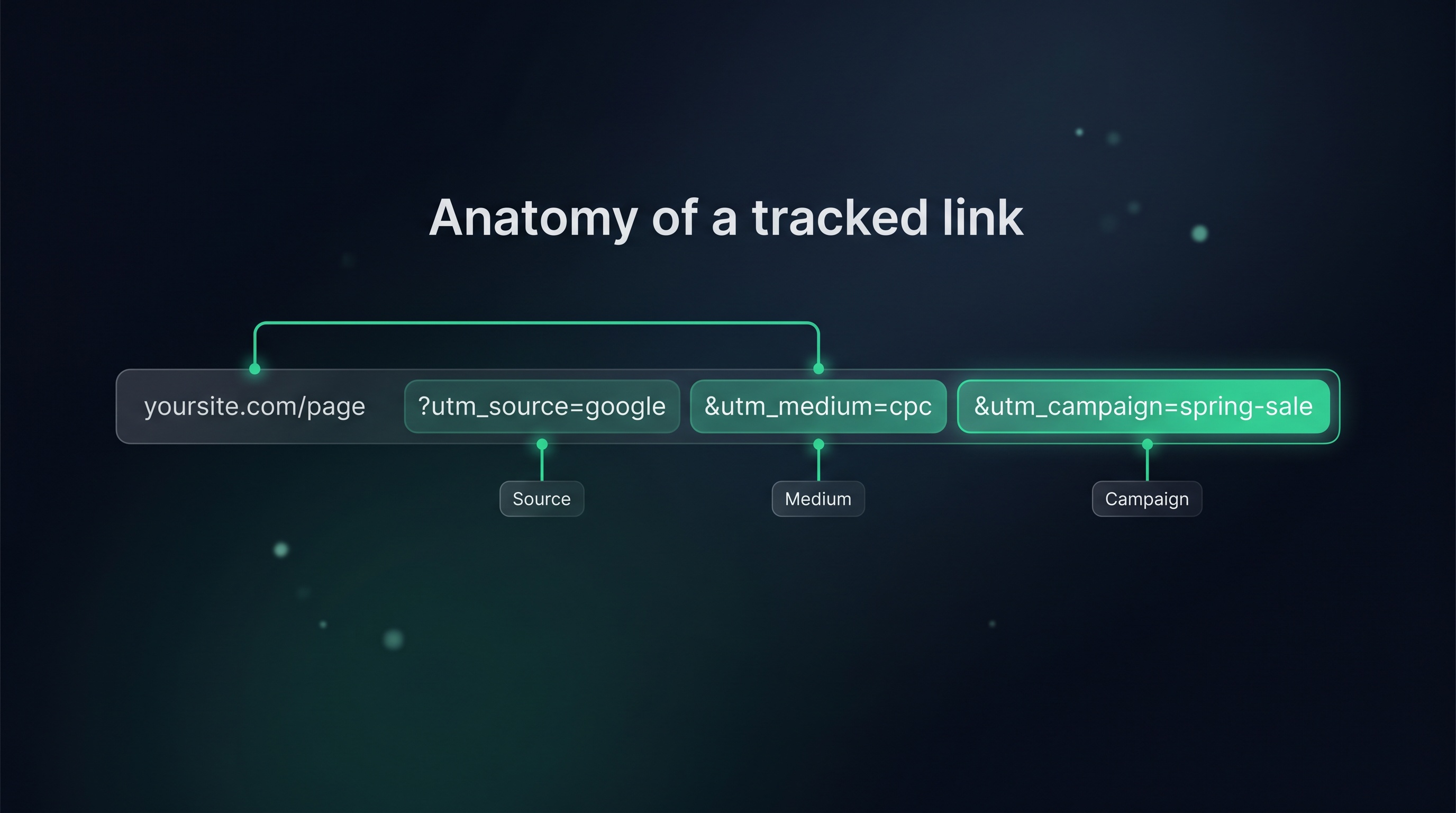
https://yoursite.com/?utm_source=facebook&utm_medium=social&utm_campaign=spring-promo
Everything after the ? is the UTM. It changes nothing the visitor sees — the page loads exactly the same. It just whispers to your analytics: "this person came from your spring promo on Facebook."
2The 5 UTM Tags
There are five UTM tags. You don't always need all five — the first three do most of the work.
- utm_source — where the link lives. The specific place:
facebook,google,newsletter,instagram. - utm_medium — what type of channel it is:
social,email,cpc(paid ads),referral. - utm_campaign — which campaign it's part of:
spring-promo,winter-sale,new-service-launch. - utm_term — the paid keyword, if you're tracking one. Mostly for ad campaigns. Optional.
- utm_content — which version of a link, when you have two in the same place:
top-buttonvsfooter-link. Optional.
A simple way to remember the three that matter: source is the website, medium is the channel type, campaign is the reason you're running it.
3How to Build a UTM Link (The Free Way)
You never have to type these by hand. Google gives you a free tool that builds the link for you.
Step 1 — Open Google's Campaign URL Builder
Go to Google's free Campaign URL Builder (link in the Sources below). It's a simple web page with a few boxes — no account, no cost, no install.
Step 2 — Paste Your Web Address
In the first box, paste the page you want people to land on — your homepage, a service page, a booking page, whatever the link should open.
Step 3 — Fill In Source, Medium, Campaign
Fill in the three boxes that matter:
- Campaign source → where the link lives (e.g.
facebook) - Campaign medium → the channel type (e.g.
social) - Campaign name → the campaign (e.g.
spring-promo)
Leave term and content blank unless you specifically need them. Most local businesses don't, to start.
Step 4 — Copy the Generated Link
The tool builds the full tagged link at the bottom of the page. Copy it. That's the link you now use everywhere you'd have used the plain one — in the ad, the post, the email button.
That's it. Repeat for each place you share a link, changing the source each time.
4A Simple Naming Convention (So It Stays Tidy)
Here's the one thing that trips people up. Analytics treats Facebook, facebook, and FB as three different sources. Mix them up and your reports turn to mush.
So set a few simple rules and stick to them:
- Always lowercase.
facebook, neverFacebook. - Use hyphens, not spaces.
spring-promo, neverspring promo. - Keep a short, fixed list. Decide once that your channels are
facebook,instagram,google,newsletter— and never invent new spellings. - Write it down. Keep a simple sheet of your standard sources, mediums, and campaign names so every link matches.
At Bare Bayside Labs, we see more UTM setups ruined by messy naming than by anything technical. The tags are easy. The discipline of spelling them the same way every time is what makes the reports trustworthy.
Spend five minutes agreeing your naming before you build a single link. It saves hours of confusing reports later.
5How to See It All in GA4
Once your tagged links are out in the world, you need somewhere to read the results. That's Google Analytics 4 — GA4 — and it's also free.
GA4 reads UTM tags automatically. You don't configure anything; if your analytics is installed on your site, it's already capturing the tags from every tagged link.
To see the data, open GA4 and look under the Acquisition reports, specifically Traffic acquisition. There you'll see your visitors grouped by source and medium — exactly the utm_source and utm_medium you set. You can see which campaigns brought people in, and if you've connected your site's enquiries or sales, which ones actually led to business.
That's the payoff. Instead of guessing, you can finally say "the newsletter brought in three jobs and the Facebook ad brought in none" — and shift your time and money accordingly.
6Where This Fits
UTM tracking is the measurement layer under everything else you do. It's how you know which marketing is worth keeping.
It pairs naturally with your follow-up system: when a tagged lead comes in, you know both where they came from and that they'll get chased properly. See the follow-up journey, mapped for how source-tracking slots into the bigger picture, and marketing automation for small business for where it fits in the whole system.
And if your ads feel like they're not working, this is step one — because without UTMs, you genuinely can't tell. Why your ads aren't working starts here.
Key takeaways
- UTMs are free text tags added to your links. Nothing to install, nothing to pay — they just tell your analytics where each visitor came from.
- Five tags exist, but three do the work: source (the website), medium (the channel type), and campaign (the reason).
- Google's free Campaign URL Builder makes the link for you. Paste your address, fill three boxes, copy the result.
- Naming discipline matters more than the tech. Lowercase, hyphens, and a short fixed list keep your reports trustworthy.
- GA4 is free and reads UTMs automatically. Find your results under Acquisition → Traffic acquisition, grouped by source and medium.
Common questions
Do UTM tags cost anything?
No. UTM tags are free, Google's Campaign URL Builder that creates them is free, and GA4 that reads them is free. There's no tool to buy and nothing to subscribe to — it's all built into the standard, free Google tools.
Will UTM tags change what my visitors see?
No. The tags sit at the end of the link and do nothing to the page itself. The visitor lands on exactly the same page they would have without them. The tags are only read by your analytics in the background.
Which UTM tags do I actually need?
Source, medium, and campaign. Those three answer "where did this person come from and why." Term and content are optional extras for paid keywords and testing different link versions — skip them until you specifically need them.
Where do I see the data once links are tagged?
In GA4, under the Acquisition reports — Traffic acquisition shows visitors grouped by source and medium. If your enquiry form or sales are connected to GA4, you can also see which tagged links actually led to business, not just clicks.
What's the most common UTM mistake?
Inconsistent spelling. Analytics treats Facebook and facebook as two different sources, so mixed capitalisation and spacing splinter your reports. Agree a simple naming convention — all lowercase, hyphens not spaces, a fixed list of names — and use it every time.
Related articles
Want to see which channels are actually winning your competitors their customers?
Get a free competitor snapshot — we show you where rivals show up online and where the gaps are.
Get your free snapshot→