You keep hearing you should "automate your marketing," but nobody tells you what that actually means — or whether it's worth paying for. We hear this from nearly every local business we work with: they know leads are slipping, they're drowning in admin, and "automation" sounds like something built for big companies with a tech team. Here's the short version: marketing automation just means the routine jobs — replying to enquiries, following up, requesting reviews, tracking where leads come from — happen on their own, on a schedule, instead of when you finally remember. This guide explains what it is in plain English, shows you the real automations a small business actually uses, and tells you honestly what it costs to set up.
1What Marketing Automation Actually Is
Marketing automation is software doing the repetitive customer jobs you'd otherwise do by hand — and forget half the time.
That's it. There's no magic. You write a message or a rule once, and the system runs it for every customer, every time, without you pressing a button.
Think about what happens in a normal week. Someone fills in your contact form. You mean to reply but you're on a job. Three days later you find the email and they've already booked someone else. A past customer would've left a glowing review if you'd asked — but you didn't ask. You spent two evenings copying enquiries into a spreadsheet.
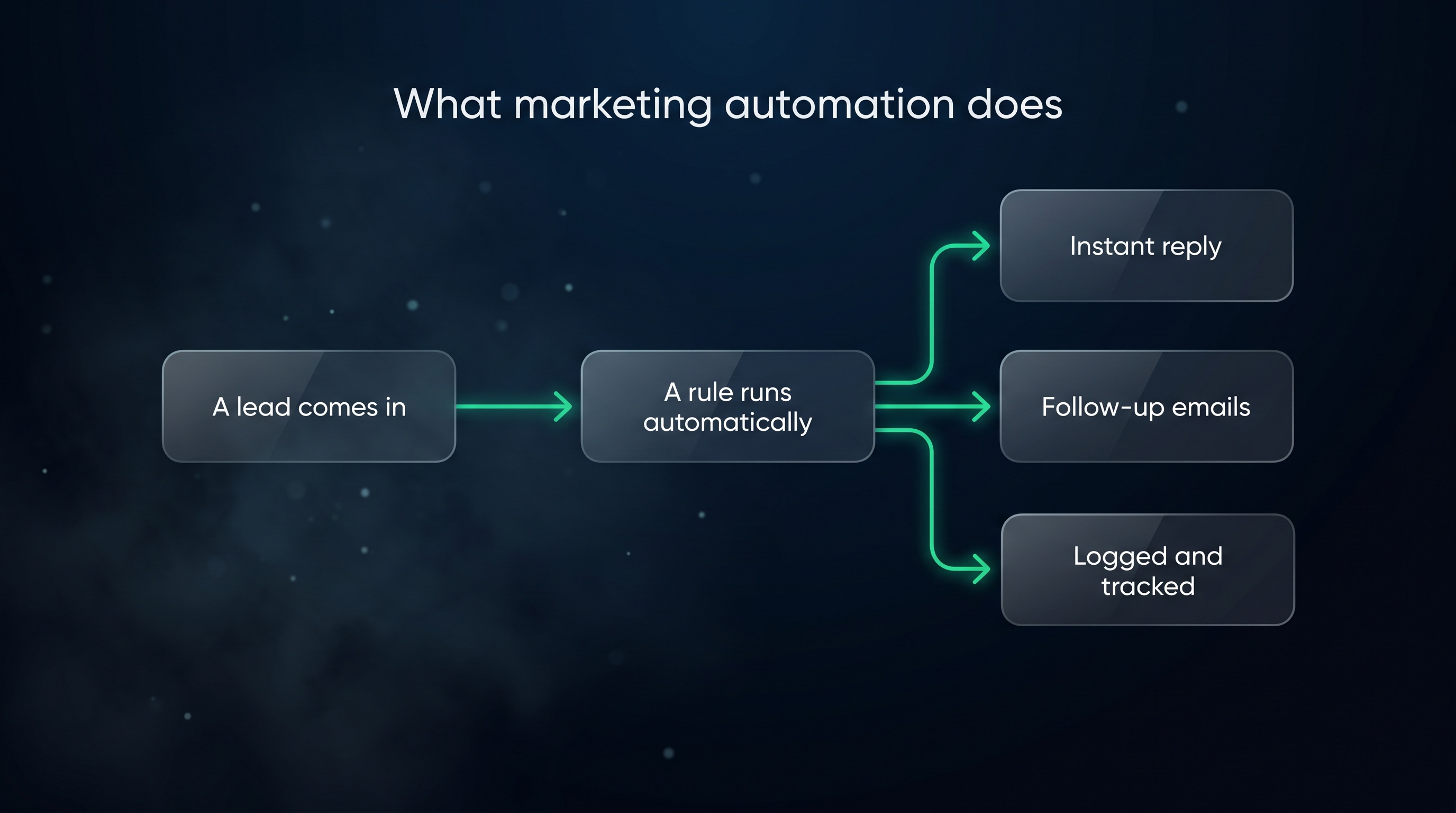
Automation handles all of that quietly in the background. The enquiry gets an instant reply. The follow-up goes out on day two. The review request lands the day after the job's done. The lead source gets logged automatically.
You're not replacing yourself. You're handing off the parts that don't need a human — so the parts that do (the call, the quote, the actual work) get your full attention.
It's "if this, then that," nothing cleverer
If the word "automation" sounds intimidating, swap it for a simpler idea: rules. Every automation is just an "if this happens, then do that" instruction you give once.
- If a new enquiry comes in → then send the welcome reply.
- If a job is marked complete → then send a review request.
- If a quote's been sitting for three days with no reply → then send a gentle nudge.
You're not writing code. You're writing the same instructions you'd give a brilliant assistant who never forgets, never sleeps, and never gets too busy to follow through. That's the whole mental model. Once it clicks, the rest is just deciding which jobs to hand over.
Automation isn't the same as spam
One worry we hear a lot: won't automating my marketing make me sound like a robot? It will — if you write robotic messages. It won't if you don't.
Good automation is invisible to the customer. The emails sound like you. They arrive at sensible moments. And the moment a real conversation starts, the automated messages stop. The system's job is to behave like a thoughtful version of you on your best day, not to carpet-bomb people with templates. Get the writing right and most customers never realise a machine was involved at all.
2Why It's Worth Doing (Even for a One-Person Business)
The honest reason automation pays off is simple: most of your day isn't selling. It's admin.
Sales reps spend only 28% of their week actually selling. The rest goes to admin, data entry, meetings, and chasing information. — Salesforce State of Sales, 2023. At Bare Bayside Labs, we see the same thing in solo operators and small teams — the actual money-making work gets squeezed into the gaps between paperwork.
Automation gives some of that time back. Not by working faster, but by removing the jobs that never needed you in the first place.
It also stops the quiet leaks. The leads you forgot. The quotes that went cold. The reviews you never asked for. None of those feel like a crisis on any single day, but they add up to real money over a year.
Picture two versions of the same business. In the first, every enquiry depends on the owner having a free moment to reply, remember, and follow up — so on busy weeks, leads slip. In the second, the routine touches happen automatically no matter how busy the week gets, and the owner only steps in for the conversations that are actually moving. Same owner, same skills, same leads coming in. The only difference is whether the follow-through depends on memory or runs on its own. Over a year, that difference is the gap between a steady business and a stressed one.
A widely cited figure puts the return on CRM software at $8.71 for every dollar spent. — Nucleus Research, 2014. We'd treat that number with caution — it's over a decade old, and Nucleus's newer estimate is closer to $3.10 per dollar. The point stands either way: a system you actually use tends to earn back more than it costs, mostly by catching work you were already losing.
The catch — and we'll come back to this — is that the return only shows up if the system gets set up properly and then actually used. A half-finished automation is just another monthly bill.
3The Real Automations a Small Business Uses
Forget the buzzwords. Here are the automations that genuinely move the needle for a local business, roughly in the order most people should build them. Each one links to a full walkthrough if you want the detail.
Instant reply when someone enquires
The single highest-value automation is the one that fires the moment a lead comes in. Someone submits your form, and within seconds they get a friendly message: "Got your enquiry — we'll be in touch shortly."
It costs you nothing once it's set up, and it does two jobs. It reassures the customer you're real and responsive. And it buys you time to call back properly without them drifting to a competitor.
Speed is the whole point here. The few minutes after someone enquires is when they're most interested — and most likely to be messaging your competitors too. An instant reply gets you in the door while they're still paying attention, instead of arriving a day later when they've already moved on.
This first reply is the opening move in a longer sequence. To see the whole path — from enquiry to instant confirmation to booked job — read What Happens After Someone Enquires? The Follow-Up Journey, Mapped.
The follow-up sequence
Most sales aren't won on the first message. They're won on the third, fourth, or fifth — long after most businesses have given up.
A follow-up sequence is a handful of pre-written messages that go out over a couple of weeks: a value email, a bit of social proof, a soft check-in, a final "we're here when you're ready." All automatic. You only step in when someone replies.
We've written the actual emails out for you, with templates you can paste and adjust, in The 5 Follow-Up Emails Every Local Business Should Automate. When you're ready to build the sequence itself — capture form, triggers, timing, stop conditions — the step-by-step is in How to Automate Your Follow-Up Emails.
Review requests after a job
Reviews are one of the strongest things a local business has going for it, and the best time to ask is right after a job's done well — when the customer's happy and it's fresh.
The problem is remembering to ask, every single time. Automation removes that. When a job is marked complete, the system sends a short, polite request with a direct link. No awkward asking in person, no forgetting.
Because it runs on every completed job, it also turns reviews from a thing you do in bursts into a steady trickle. That matters — a slow, steady stream of fresh reviews tends to do more for a local business than a one-off pile, because both customers and search engines pay attention to how recent your reviews are.
Appointment and quote reminders
If you book appointments or send quotes, automated reminders cut your no-shows and rescue jobs that would otherwise go quiet. A nudge the day before an appointment. A gentle check-in two or three days after a quote with no reply.
These are small touches that protect work you've already won. A quote that goes quiet usually isn't a "no" — it's a "not yet" that nobody followed up on. One automated nudge at the right moment recovers a surprising amount of work that would otherwise just evaporate.
Lead-source tracking
This one isn't a message — it's a quiet bit of bookkeeping that tells you which marketing is actually working.
When a lead comes in, the system records where it came from: a Google ad, a Facebook post, a referral, your website. Over a few months, that data shows you where to spend more and what to cut. Most of it runs on free tracking tags called UTMs — we explain them simply in How to Set Up UTM Tracking (Free, Step by Step).
Without this, marketing is guesswork. You feel like the ads are working, or the referrals are drying up, but you can't prove it. With lead-source tracking running quietly in the background, you stop guessing — you can see which channel brings real jobs and which one's just spending your money.
Recurring admin: reports and data entry
The least glamorous automations are often the most freeing — the ones that kill repetitive data entry and pull your numbers together for you.
When small businesses started automating, the most common jobs they handed off were data entry (38%), document creation (32%), and lead management and follow-up (30%). Around 70% said automation improved their productivity. — Zapier State of Business Automation, 2021. We'd note this lines up with what we see: the wins people feel first are the boring, repeated jobs, not the flashy ones.
If you're staring at this list wondering where to start, you don't have to do all of it. Pick one. Our guide What Should You Automate First? 7 Tasks for Any Small Business ranks them so you get the biggest win for the least effort.
4What Marketing Automation Costs
Here's where people brace for a big number. The reality is that the software is cheap — sometimes free. The real cost is the setup.
The tools themselves
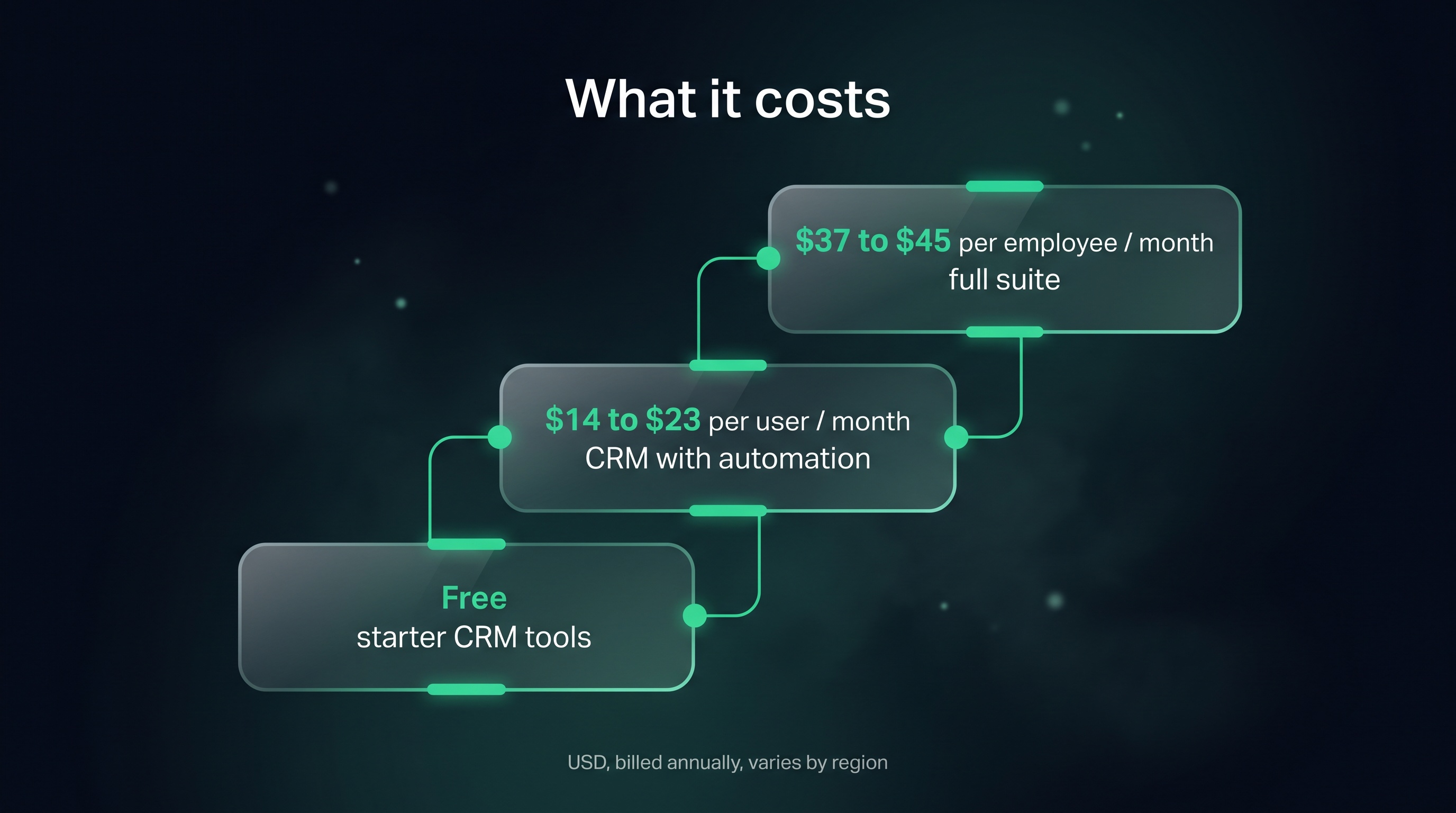
Most small businesses run automation through a CRM (the system that stores your customer records and runs the rules). Pricing for the common platforms, in USD and billed annually, looks roughly like this — prices vary by region and billing terms, so treat these as a guide, not a quote:
| Platform | Entry price | Notes |
|---|---|---|
| HubSpot | $0 free CRM; Starter ~$15–20/seat/mo | Professional jumps to ~$100+/seat/mo |
| Zoho CRM | Standard ~$14/user/mo; Professional ~$23 | — |
| Zoho One | ~$37/employee/mo (all-employee) or ~$90/user | Bundles CRM plus ~40 other apps |
| Pipedrive | Lite ~$14 → Ultimate ~$79/seat/mo | — |
| Salesforce | Starter ~$25/user/mo; Pro ~$100 | — |
For a one-person or small local business, you're realistically looking at a free tier to get started, or somewhere around $14–45 a month once you need proper automation. That's the whole software bill for the system that runs your follow-ups, reminders, and tracking.
If you want the full breakdown — including what each tier actually gives you — see What a CRM Actually Costs — and What Skipping One Costs You. And if you're still not sure you need one at all, start with Do You Actually Need a CRM? Here's How to Know.
The cost that actually matters: setup
The subscription isn't the expensive part. The setup is.
A system that's configured once — forms connected, emails written, rules built, tested — pays for itself fast. A system that sits half-finished is just a bill you keep paying for nothing.
We see this constantly. A business signs up for a platform, gets busy, and never finishes wiring it up. Months later they're paying for software that's doing none of the things they bought it for. The tool was never the problem. The unfinished setup was.
So the honest cost of marketing automation is a small monthly fee plus one solid block of focused setup time — yours, or someone's you trust to do it once and do it right. Budget the time the same way you'd budget the money. The fee is small and predictable; the setup is the part that decides whether the whole thing earns its keep or just sits there.
What about hiring an agency instead?
A fair question. Some businesses would rather hand the whole thing to a marketing agency than learn a CRM. There are real trade-offs both ways — agencies cost more per month but carry the work for you; DIY automation is cheaper but you own the setup.
We've laid out the honest comparison, including the real cost ranges on both sides, in Marketing Automation vs Hiring an Agency: Which Is Worth It?.
5How to Start (Without Getting Overwhelmed)
The mistake most people make is trying to automate everything at once. Don't. Here's the calm way in.
Pick the one leak that's costing you most
Look at where work actually slips away. For most local businesses it's the follow-up gap — leads come in and nobody chases them. If that's you, start there. If you're losing past customers because you never ask for reviews, start with review requests instead.
One automation, done well, beats five half-built ones.
Write the message before you touch the software
Automation is just a delivery system. The thing that matters is what it says. Write your instant-reply message and your first follow-up email in plain language — the way you'd actually talk to a customer — before you log into any tool.
Read them out loud. If they sound like a brochure, rewrite them until they sound like you. The software will send whatever you give it, perfectly, forever — so it's worth getting the words right before you press go.
Build it, test it, then leave it alone
Set up the one automation. Send yourself through it as if you were a customer. Read the emails on your phone, because that's where most people will see them. Check the timing. Once it works, let it run.
Resist the urge to keep fiddling. A good automation is one you can forget about — it just works in the background while you get on with the job.
Add the next one a few weeks later
Once the first automation is running on its own, add the next. This slow build means you understand each piece, nothing breaks silently, and you never feel buried. Within a couple of months you'll have a quiet system handling the admin that used to eat your evenings.
That's the whole game. Marketing automation isn't a big software project. It's a series of small, boring, high-value jobs handed off one at a time — so the leads stop leaking and you get your time back.
Key takeaways
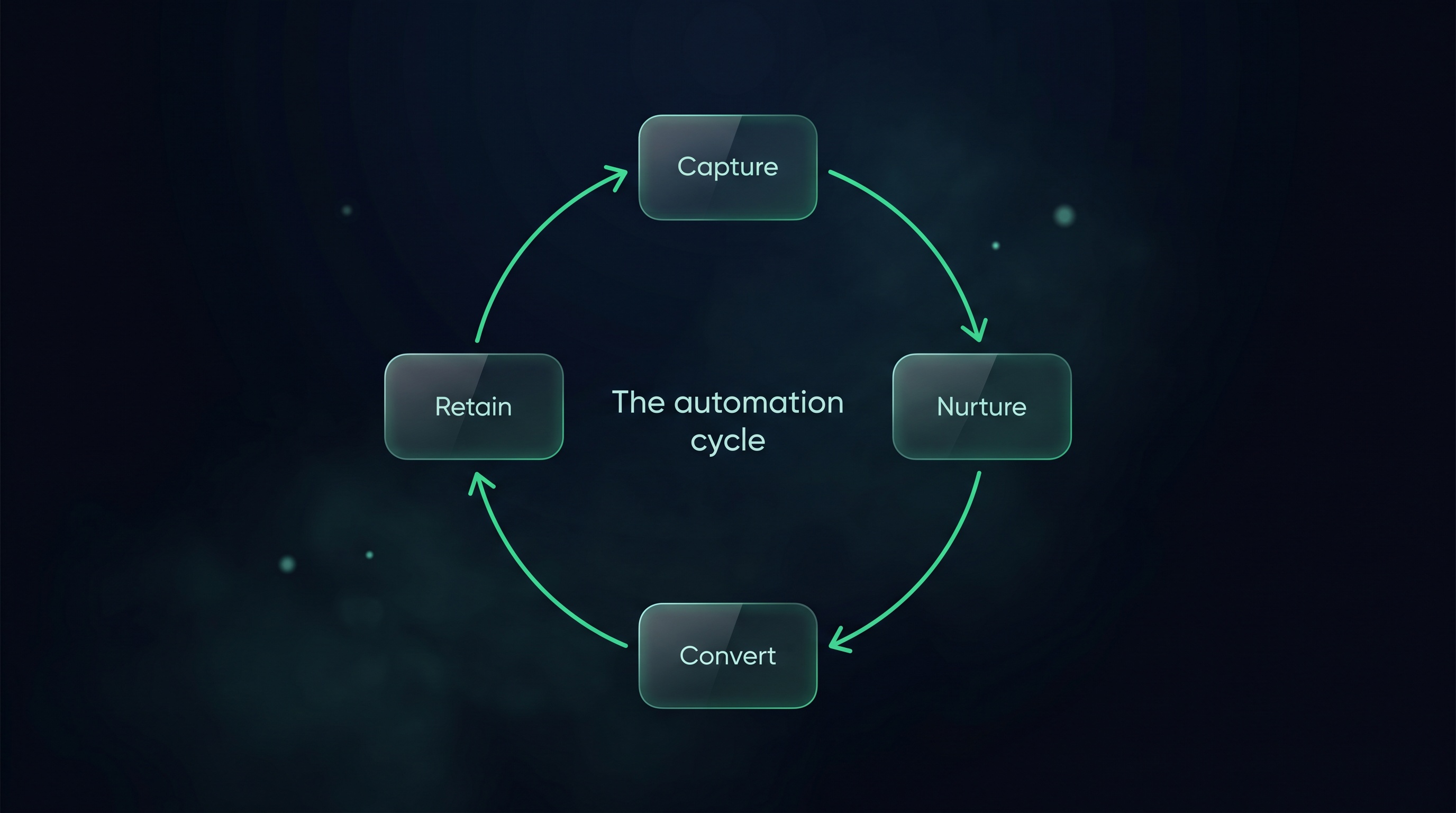
- Marketing automation just means routine customer jobs happen on their own — instant replies, follow-ups, review requests, and lead tracking — instead of when you remember.
- The reason it pays off is that most of your week isn't selling. A large share goes to admin, and automation hands those jobs off.
- The software is cheap; the setup is the real cost. A half-finished system is just a bill — a finished one earns back more than it costs.
- For a small business, expect a free tier or roughly $14–45/month once you need proper automation, plus one block of focused setup time.
- Start with one automation, not ten. Fix the biggest leak first, test it, then add the next a few weeks later.
Common questions
What does marketing automation actually do for a small business?
It runs the repetitive customer-facing jobs for you — instant replies to enquiries, a follow-up sequence, review requests after a job, appointment reminders, and tracking where leads come from. You set each one up once and the software handles it for every customer from then on.
Is marketing automation only for big companies?
No. The tools are cheap or free, and the biggest wins — never missing a lead, always following up, always asking for the review — matter most for small businesses where there's no admin team to catch the gaps. A one-person business often benefits more than a large one.
How much does it cost to automate my marketing?
The software is usually $0 to around $45 a month for a small business, depending on the platform and the features you need. The bigger cost is the one-off setup time to get everything wired up and tested. Done once, it tends to pay for itself by recovering work you were already losing.
What should I automate first?
Whatever's leaking the most money. For most local businesses that's lead follow-up — the enquiries that come in and never get chased. If you're losing repeat business instead, start with automated review requests. Build one thing well before adding the next.
Do I need to be technical to set this up?
No. Modern CRM tools are built for non-technical owners, with rule-based "if this, then that" automation you can set up by clicking through menus. The hardest part is writing the messages, not building the rules — and you can always hand the one-time setup to someone who does it daily.
Related articles
Want to see exactly where your follow-up and tracking are leaking work?
Get a free competitor snapshot — we show you where rivals show up online and where the gaps are.
Get your free snapshot→